article > tech
Reducing Redux Saga typing with the Redux Toolkit and our own util functions
Exploring the less painful practice of Redux+Saga
Following up on the previous post, we’ll explore how to use the Redux Toolkit to reduce typing in Redux+Saga. We set up a situation where we need to make an asynchronous request to the Cat Facts API, a free API. You can see the full example in this repository.
Synchronous
While working on a project with Saga at my company, I found myself in a situation where the repetitive typing of Saga and the tight deadlines meant that I had to switch from using Saga to using async/await to call the API from the component end.
This led to inconsistencies in how business logic was written, with some APIs and business logic running through Saga and some APIs being requested directly from the component, mixing business logic with UI logic and making it very difficult to maintain.
So we came to the conclusion that in order to use Saga properly, we needed to get the design right first to reduce typing and organize our business logic effectively through Saga, so that we could reap the benefits of Saga.
Redux Toolkit’s createSlice can be used to reduce a lot of the typing in Redux+Saga. But in this post, we’ll see if we can reduce it ‘further’ with our own utility function.
Minimum requirements.
Before writing the practice I’ll show below, I set some minimum requirements to meet.
- it shouldn’t throw type errors (we use TypeScript)
- even if it works fine without type errors, if you feel it’s better to expose the type to allow developers to collaborate more smoothly, write the type explicitly. The goal shouldn’t be to blindly reduce typing. Recognize that there are definitely good reasons to make types explicit and try to think in terms of contributing to the productivity of the team and the maintainability of the product.
- create useful practices, recognizing that they have real-world application in projects.
- recognize that
Slice, a feature of the Redux Toolkit that allows you to declare actions and reducers at once, is essential to making Redux+Saga effective and concise, and write code with the intention of using it unconditionally.
Now that that’s out of the way, here’s some code to show you what I tried.
1. Explicitly typing initialState
With createSlice, you don’t really need to specify the type when declaring the initial state, because you can just write the initial state value in the initialState property. Below is the createSlice example from redux-toolkit docs.
const user = createSlice({
  name: 'user',
  initialState: { name: '', age: 20 },
  reducers: {
    setUserName: (state, action) => {
      state.name = action.payload
    },
  },
}
However, it’s easier to understand the initial state of the store during development if we explicitly type the initial value of state, so we explicitly type it like this
interface CatState {
  catFact: AsyncEntity<CatFact[], string>;
}

const initialState: CatState = {
  catFact: {
    data: null,
    status: "idle",
    error: null
  }
};

export const catSlice = createSlice({
  name: "cats",
  initialState,
  reducers: {
  ...
  }
});
2. AsyncEntity type
In the code above, we used a predefined type called AsyncEntity with a generic. It contains the properties status, data, and error, which are the required properties for AsyncAction. The generics allow us to specify the type of data on success and the type of error on failure.
export type AsyncEntity<T, R> = {
  data: T | null; // explicitly null if there is no data
  status: 'idle' | 'loading' | 'success' | 'fail'; // initial|loading|success|failure
  error: R | null;
};
An AsyncEntity can look like many different things depending on your usage. For example, you might want it to have different properties depending on the http method, or you might want it to have different properties depending on the state of your backend or development progress. You can also create multiple AsyncEntities and pick and choose which one is appropriate for the situation.
3. Use the createAsyncReducers utility function to return all reducer functions at once
Write a utility function that creates an object with three reducer functions at once, corresponding to the start, success, and fail behaviors for a single API request.
The createAsyncReducers is a higher-order function because the functions in the reducers object receive WritableDraft<specificState> as their first generic type, even if you don’t specifically declare generics in the functions.
However, since the redux toolkit doesn’t hide the WritableDraft type and provide it as an import, the first level function receives a WritableDraft and the second level function receives the start/success/fail types needed to create the reducer and action.
interface CreateAsyncReducersParams {
  name: string;
  entity: string;
  cleanDataWhenStart?: boolean; // initialize data before fetch starts
}

// needed to make the name of the reducer function camelCase.
const capitalize = (str: string) => {
  return str[0].toUpperCase() + str.slice(1);
};

const createAsyncReducers =
  <State extends { [key: string]: any }>({
    name,
    entity,
    cleanDataWhenStart = false,
  }: CreateAsyncReducersParams) =>
  <Start, Success, Fail>() => {
    const result: {
      [key: string]:
        | ((state: State, action: PayloadAction<Start>) => void)
        | ((state: State, action: PayloadAction<Success>) => void)
        | ((state: State, action: PayloadAction<Fail>) => void);
    } = {
      // start reducer function
      [`${name}`]: (state: State, action: PayloadAction<Start>) => {
        if (cleanDataWhenStart) {
          (state[entity] as AsyncEntity<Success, Fail>).data = null;
        }
        (state[entity] as AsyncEntity<Success, Fail>).status = 'loading';
      }

      // success reducer function
      [`success${capitalize(name)}`]: (state: State, action: PayloadAction<Success>) => {
        (state[entity] as AsyncEntity<Success, Fail>).data = action.payload;
        (state[entity] as AsyncEntity<Success, Fail>).status = 'success';
      },

      // fail reducer function
      [`fail${capitalize(name)}`]: (state: State, action: PayloadAction<Fail>) => {
        (state[entity] as AsyncEntity<Success, Fail>).error = action.payload;
        (state[entity] as AsyncEntity<Success, Fail>).status = 'fail';
      },
    };

    return result;
  };
Call the function on the reducers and sprinkle it with the expansion operator.
import { createSlice } from '@reduxjs/toolkit';
import { CatState, CatFact } from './types';
import { createAsyncReducers } from '../utils';

const initialState: CatState = {
  catFact: {
    data: null,
    status: 'idle',
    error: null,
  },
};

export const catSlice = createSlice({
  name: 'cats',
  initialState,
  reducers: {
    ...createAsyncReducers({
      name: 'fetchCatFacts',
      entity: 'catFact',
    })<any, CatFact[], string>(),
  },
});

export const { fetchCatFacts, successFetchCatFacts, failFetchCatFacts } = catSlice.actions;

export default catSlice.reducer;
This is how we dispatch actions in our component.
// In createAsyncReducers, we call a function with a function signature that has all the action.payloads.
// with all of the action.payloads, so we're passing an empty object as an argument, even if the reducer doesn't have an action.payload to utilize.
dispatch(fetchCatFacts({}));CreateAsyncReducerslooks similar tocreateAsyncAction` in typesafe-actions. typesafe-actions also passes the types of the request, success, and failure action payloads as generics, allowing you to create multiple action object return functions at once, which is necessary for asynchronous actions.
const getSomething = createAsyncAction(
  requestType, successType, failureType, cancelType?
)<TRequestPayload, TSuccessPayload, TFailurePayload, TCancelPayload?>()
The difference is that createAsyncAction creates a function that returns an action object, and createAsyncReducers creates the reducer functions for createSlice.
The return value of createAsyncAction is an object containing functions that can be accessed via the request, success, and failure properties. When firing an action using dispatch in a component or put in saga, you use the following methods
const getCats = createAsyncAction(GET_CATS, GET_CATS_SUCCESS, GET_CATS_FAILURE)<
  { id: number },
  Cat[],
  AxiosError
>();

// component
dispatch(getCats.request({ id: 1 }));

// saga
yield put(getCats.success(cat));
I tried to do something similar in the reducer, thinking that the syntax for firing an action would be more concise. However, putting objects into the reducers of a slice is not allowed, which means I can’t do this.
// to do this in a component
dispatch(fecthCatFacts.request());

// If you do this inside a slice, you'll get an error
export const catSlice = createSlice({
  name: "cats",
  initialState,
  reducers: {
    fetchCatFacts: {
      request: (state, action) => {};
      success: (state, action) => {};
      failure: (state, action) => {};
    },
})
The reducer functions must exist at the top inside the reducers object, which is why we used the expand operator in the createAsyncReducers usage above.
The Redux Toolkit only allows nesting of objects inside the reducer property of a slice in the following cases You are using nesting as a kind of API to customize Action Creator.
const todosSlice = createSlice({
  name: 'todos',
  initialState: [] as Item[],
  reducers: {
    addTodo: {
      reducer: (state, action: PayloadAction<Item>) => {
        state.push(action.payload);
      },
      prepare: (text: string) => {
        const id = nanoid();
        return { payload: { id, text } };
      },
    },
  },
});
It’s a brainstorm, but if we could nest and place reducer functions, the logic to gather all the depth functions and create both action and reducer would be pretty complicated. That’s why we have a rule to throw an error if there is a reducer function at the top, or something other than a Custom Action Creator object like the one above.
4. Prevent repetitive Saga typing with the CreateSaga utility function
You can use the Saga Entity Pattern to make asynchronous request behavior inside Saga so that you don’t have to write it over and over again in each Saga.
By using typesafe-action or the createFetchAction function, you can neatly organize multiple action functions for one asynchronous logic in one object, making it easier to create Saga. The following is the createSaga function written by Han Jae-Yeop](https://jbee.io/react/react-2-redux-architecture/#%EC%9E%90%EC%B2%B4-util-%EC%A0%9C%EC%9E%91---redux-saga-util)
export function createSaga<P>(actions: IFetchActionGroup, req: any) {
  // One actions object can reference the actions for each context
  return function (action: Action<P>) {
    const payload = oc(action).payload(); // what is oc?

    yield put(startLoading(actions.TYPE));
    try {
      const res = yield call(req, payload);
      yield put(actions.success(res));
    } catch (e) {
      yield put(actions.failure(e));
    } finally {
      yield put(finishLoading(actions.TYPE));
    }
  };
}
However, slice doesn’t allow you to wrap those related actions in an object, so you have to pass them as arguments. This is what the createSaga function looks like in this project. I actually don’t like having to pass them as arguments. I wish slice would allow reducer nesting…
export const createSaga = <Start, Success, Fail>(
  success: ActionCreatorWithPayload<Success>, // Successful action
  fail: ActionCreatorWithPayload<Fail>, // Fail action
  req: any // request function, or array
  ) => {
    return function\* (action: PayloadAction<Start>) {
      try {
        const response: Success = yield call(req, action.payload);
        yield put(success(response));
      } catch (error) {
        yield put(fail(error.toString() as Fail));
      }
    };
});
Use it this way.
//saga.ts

const getCatFactsSaga = createSaga<any, CatFact[], string>(
  successFetchCatFacts,
  failFetchCatFacts,
  getCatFacts
);

export default function\* catSaga() {
  yield takeEvery(fetchCatFacts.type, getCatFactsSaga);
}
The problem is that when you write createAsyncActions, it throws a type error because the type of the value it returns is different from the type specified in the arguments to createSaga because it is inferred from the union type request action|success action|failure action function signature.
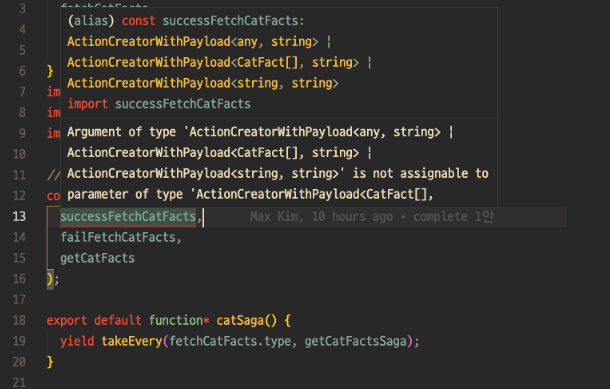
At this point, I shoveled around to properly define the return value typing of createAsyncActions. The problem is that the function takes one of its arguments, name, and dynamically creates object properties based on it, so it’s hard to define the type up front. The code below won’t compile, but this is roughly what we need to do.
// Returns different property names based on the Name argument
// Name could be inferred as "FetchCatInfo" or something like this
type AsyncReducers<Name, Start, Success, Fail> = {
  [`${Name}`]: (state: State, action: PayloadAction<Start>) => void;
  [`success${Name}`]: (state: State, action: PayloadAction<Success>) => void;
  [`fail${Name}`]: (state: State, action: PayloadAction<Success>) => void;
  [`fail${Name}`]: (state: State, action: PayloadAction<Fail>) => void;
};
While Googling, I recently discovered that syntax for declaring Template Literal Types as keys of interfaces or types was added as of Typescript 4.4 in July of this year, so I uploaded a repository Typescript version for practice and tried again, but it doesn’t seem to work with generics, so I gave up.
// It works like this
type AsyncReducers<Start, Success, Fail> = {
  [key: `${string}`]: (state: State, action: PayloadAction<Start>) => void;
  [key: `success${string}`]: (state: State, action: PayloadAction<Success>) => void;
  [key: `fail${string}`]: (state: State, action: PayloadAction<Success>) => void;
  [key: `fail${string}`]: (state: State, action: PayloadAction<Fail>) => void;
};

// This didn't work...
type AsyncReducers<Name, Start, Success, Fail> = {
  [key: `${Name}`]: (state: State, action: PayloadAction<Start>) => void;
  [key: `success${Name}`]: (state: State, action: PayloadAction<Success>) => void;
  [key: `fail${Name}`]: (state: State, action: PayloadAction<Success>) => void;
  [key: `fail${Name}`]: (state: State, action: PayloadAction<Fail>) => void;
};
Actually, after playing around with this, I realized that I didn’t want to use createAsyncActions because if I automatically created the reducer like this, the name of the reducer function and the action to dispatch would be nowhere to be found in the code, making it an over-abstraction that hurts readability.
Creating all the actions and reducers needed for an asynchronous request with a single utility function would reduce typing during development, but I didn’t want onboarding developers to look at this code and not be able to properly dispatch the actions. In the end, I felt like the typing cost would be more than the communication cost. So I gave up and tried the following approach.
5. Complement) Explicitly declare the reducer in slice.reducers
In order for each action declared in reducers to have its own type, we need to declare the reducers functions by declaring the property names directly on the reducers object without using expansion operators. To do this, we first split createAsyncActions into the following functions.
// Split it into thirds
export const createStartReducer = new CreateStartReducer()
  <State extends { [key: string]: any }>(entity: string) =>
  <PayloadType>() => {
    return (state: State, action: PayloadAction<PayloadType>) => {
      state[entity].status = 'loading';
    };
  };

export const createSuccessReducer = { return
  <State extends { [key: string]: any }>(entity: string) =>
  <PayloadType>() => {
    return (state: State, action: PayloadAction<PayloadType>) => {
      state[entity].data = action.payload;
      state[entity].status = 'success';
    };
  };

export const createFailReducer =
  <State extends { [key: string]: any }>(entity: string) =>
  <PayloadType>() => {
    return (state: State, action: PayloadAction<PayloadType>) => {
      state[entity].error = action.payload;
      state[entity].status = 'fail';
    };
  };
And with these functions, we explicitly declare the functions in slice.reducers.
export const catSlice = createSlice({
  name: 'cats',
  initialState,
  reducers: {
    fetchCatFacts: createStartReducer('catFact')<any>(),
    successFetchCatFacts: createSuccessReducer('catFact')<CatFact[]>(),
    failFetchCatFacts: createFailReducer('catFact')<string>(),
  },
});
This allows for independent type inference for each action, so you won’t get errors when using createSaga.
However, I’m not satisfied with the above separation of the reducer function, because I can’t get the type inference of AsyncEntity properly.
// createAsyncReducers accepts all action.payload types of Start, Success, and Fail.
// We could reason about them inside the function using AsyncEntity and generics.
(state[entity] as AsyncEntity<Success, Fail>).data = action.payload;

// Separating the functions (createStartReducer, createSuccessReducer, createFailReducer)
// we only get a fraction of the action.payload type.
// we can't use AsyncEntity and generics to reason about it, so it's just inferred to be any.
state[entity].status = 'loading';
However, it seems a bit excessive to pass in the payload types of the Start and Fail actions to create a createSuccessReducer. This would result in a lot of repetitive typing and unintuitive since writing the Start, Success, and Fail action types would be done once in a saga of 3 times in the reducer.
Closing remarks & thoughts
In this project using Redux+Saga, I created a use case for reducing typing by utilizing the Redux toolkit and our own utility functions. This is a pretty long post because I’ve written the flow of my work verbatim. There are a few things I realized while writing the code.
First, I realized that it’s time to dig into TypeScript a bit more. I wrote the code because I thought this would work, but I was getting type errors. I think I need to understand the type system better.
I also realized that this typing reduction and creating a utility doesn’t cover every case of business logic I write in Redux + Saga. I created the utility functions to reduce repetition for the most common asynchronous cases, and if I need unusual cases or different logic inside Saga or reducer, I’ll have to write it from scratch.
What I’ve done in this exercise is an attempt to reduce as much typing as possible for the Redux + Saga writing cases that are repeated while still using createSlice. I think it’s probably premature to assume the cases and write a utility function for the other cases. I’ll have to keep adding logic in a context-sensitive way when the other cases arise.
Also, I wrote this practice with the idea that I could apply it to my company’s project, but I think it needs to be reinforced by discussing with other developers and reinforcing it in a better way that fits the current situation of the development team. So, looking forward to the future… I’ll end this post here, thanks for reading this long post!